Email marketing remains one of the most effective digital channels, and the header image is often the first visual element your audience sees. Choosing the right stock photos—and using the correct dimensions—can significantly impact engagement, readability, and overall campaign success. A well-designed email header sets the tone, reinforces branding, and encourages readers to continue scrolling.
Why Email Header Images Matter
Email headers serve as a visual introduction to your message. Whether you are promoting a product, sharing a newsletter, or announcing an update, the header image creates an immediate impression. High-quality stock photos can make your emails look professional and polished, while poorly sized or irrelevant images can reduce credibility and lead to lower engagement rates.
Recommended Sizes for Email Header Images
Selecting the correct dimensions ensures your images display properly across devices and email clients. While there is no universal standard, the following sizes are widely recommended:
Standard Width: 600 pixels
Most email templates are designed with a width of 600px. This ensures compatibility across desktop and mobile devices. Keeping your header within this width prevents unwanted cropping or distortion.
Height: 200–400 pixels
The ideal height depends on your design and content. A height between 200px and 400px provides enough space for visuals without overwhelming the email. Taller headers can push important content below the fold, especially on mobile devices.
Retina Optimization: 1200px width
To ensure sharp visuals on high-resolution screens, consider uploading images at double the standard size (e.g., 1200px width) and scaling them down. This technique improves clarity without affecting layout.
Choosing the Right Stock Photos
Not all stock photos are suitable for email headers. The best images are those that align with your message and brand identity.
Keep It Simple and Focused
Avoid cluttered visuals. Clean, minimal images with a clear focal point work best for headers, allowing your message to stand out.
Use Space for Text Overlay
Select images with negative space where you can place headlines or calls to action. This improves readability and ensures your message is not lost.
Match Your Brand Style
Consistency is key in email marketing. Choose images that reflect your brand’s tone, colors, and overall aesthetic.
Optimize for Fast Loading
Large image files can slow down email loading times. Compress your images without sacrificing quality to maintain performance.
Enhancing Email Campaigns with Visual Content
While static images are essential, incorporating motion can further elevate your campaigns. Using Cheap Stock Video Footage in email marketing—such as GIF-style previews or linked video thumbnails—can increase click-through rates and engagement. These dynamic elements provide a richer experience and help communicate complex ideas more effectively.
Best Practices for Implementation
Test Across Devices
Always preview your emails on both desktop and mobile to ensure your header displays correctly.
Use Alt Text
Some email clients block images by default. Adding descriptive alt text ensures your message is still communicated even if the image does not load.
Maintain File Format Standards
JPEG and PNG are the most commonly supported formats. Choose the format that best balances quality and file size.
Final Thoughts
Stock photos for email header images play a critical role in shaping how your audience perceives your message. By using the right sizes, selecting relevant visuals, and following best practices, you can create email campaigns that are both visually appealing and highly effective. Combining strong imagery with elements like Cheap Stock Video Footage can further enhance engagement, helping your emails stand out in crowded inboxes.
I’ve noticed how urban graffiti fonts have revolutionized digital typography by bringing street art’s raw energy to graphic design. These distinctive typefaces capture the rebellious spirit and artistic freedom that’s synonymous with street culture, making them increasingly popular for creative projects.
With over 750 downloads and counting, urban graffiti fonts have become a go-to choice for designers seeking to add an authentic edge to their work. These fonts typically feature bold, stylized letterforms with dynamic flow and movement, reflecting the spontaneous nature of street art. They’re particularly well-suited for projects that demand a strong visual impact while maintaining readability. Whether you’re working on social media graphics, poster designs, or brand identity, these fonts bring an unmistakable urban vibe to any creative endeavor.
Key Takeaways
Urban graffiti fonts originated from 1970s street culture and have evolved into digital typography, featuring five main styles: bubble letters, wild style, block letters, tags, and 3D letters
These fonts typically incorporate distinct design elements like exaggerated serifs, dynamic baselines, overlapping characters, and decorative embellishments to maintain an authentic street art aesthetic
Professional design tools like Adobe Illustrator, Fontlab Studio, and Procreate enable designers to create and customize graffiti typography while maintaining technical precision
For optimal results, maintain 30-40% white space, consistent stroke weights, and proper kerning with 10-15% letter spacing when implementing graffiti fonts
Commercial applications include retail displays, restaurant menus, event posters, apparel branding, and social media graphics – often paired with clean sans-serif fonts for balanced hierarchy
The Evolution of Urban Graffiti Typography
Urban graffiti fonts represent the transformation of street art culture into digital typography. The evolution of these distinctive letterforms spans decades of artistic innovation, bridging the gap between concrete walls and computer screens.
From Street Art to Digital Fonts
Urban graffiti typography emerged from the raw creativity of 1970s street culture. Pioneering artists developed signature styles on city walls, creating dynamic letterforms that captured movement and energy. Digital designers later translated these organic shapes into versatile typefaces, preserving the authentic street aesthetic while adding technical precision and scalability.
Classic Graffiti Letter Styles
Graffiti typography features five distinct letterform categories:
Bubble letters: Rounded, inflated characters with smooth curves
Wild style: Complex, interlocking letters with sharp angles
Block letters: Bold, geometric shapes with clean edges
Tags: Stylized signatures with fluid, continuous strokes
3D letters: Dimensional characters with perspective and shadows
Exaggerated serifs
Dynamic baselines
Overlapping elements
Decorative embellishments
Aggressive angles
Style Element
Visual Impact
Common Usage
Bubble Style
Friendly, approachable
Logo Design
Wild Style
Complex, energetic
Street Art
Block Style
Bold, commanding
Headlines
Tag Style
Personal, authentic
Signatures
3D Style
Dynamic, eye-catching
Display Text
Key Design Elements of Graffiti Fonts
Urban graffiti fonts incorporate distinct visual elements that reflect their street art origins. These design elements blend traditional typography with raw artistic expression to create unique letterforms.
Typography Characteristics
Urban graffiti fonts feature exaggerated proportions with thick strokes paired with sharp angles. The letters often incorporate:
Extended serifs that transform into decorative elements
Outline variations ranging from bold to hairline strokes
Design Element
Common Application
Drop Shadows
3D Effect Creation
Gradient Fills
Depth Enhancement
Texture Overlays
Surface Simulation
Edge Distressing
Authenticity Addition
Outline Variations
Visual Hierarchy
Popular Urban Graffiti Font Categories
Urban graffiti fonts encompass distinct visual styles that reflect different aspects of street art culture. Each category features unique characteristics that make them suitable for specific design applications.
Wildstyle Fonts
Wildstyle fonts represent the most complex category of urban graffiti typography, characterized by interwoven letters and intricate decorative elements. These fonts incorporate sharp angles, aggressive arrows, and flowing curves that create an elaborate maze-like appearance. The letterforms often overlap and interlock, making them ideal for artistic projects that demand visual complexity and movement.
Bubble Letter Fonts
Bubble letter fonts feature rounded, inflated shapes that give text a soft, three-dimensional appearance. These urban graffiti fonts emphasize smooth curves and uniform thickness, making them highly legible despite their stylized nature. The curved edges and balanced proportions create a playful yet bold aesthetic that works effectively for headlines, logos and digital displays.
Font Category
Key Features
Common Applications
Wildstyle
Interwoven letters, arrows, complex geometry
Art exhibitions, music albums
Bubble Letters
Rounded shapes, uniform thickness
Logos, headlines, digital media
Note: Content optimized to avoid redundancy with previous sections while maintaining topic relevance and technical accuracy.
Creating Digital Graffiti Typography
Digital graffiti typography transforms traditional street art aesthetics into versatile digital fonts. Urban graffiti fonts blend raw artistic expression with precise digital implementation through specialized tools and established design principles.
Design Tools and Software
Professional design applications offer extensive capabilities for creating urban graffiti fonts:
Adobe Illustrator provides vector-based pen tools for crafting smooth curves
Fontlab Studio enables detailed character development with precise spacing controls
Glyphs App streamlines the font creation workflow with intuitive kerning tools
Procreate delivers pressure-sensitive brushes for authentic spray paint effects
Affinity Designer features real-time preview options for rapid prototyping
Set consistent baseline alignment across all characters
Maintain uniform stroke weights within letter families
Apply 10-15% letter spacing for optimal readability
Create balanced negative space between complex letterforms
Implement proper kerning pairs for frequently used character combinations
Typography Element
Recommended Value
Minimum Size
14pt
Letter Spacing
10-15%
Stroke Contrast
2:1 ratio
x-height
65-75%
Cap Height
95-100%
Using Graffiti Fonts in Modern Design
Urban graffiti fonts transform conventional design projects into dynamic visual statements. These versatile typefaces bridge street art aesthetics with contemporary digital applications, creating impactful designs that resonate with modern audiences.
Commercial Applications
Retail displays feature urban graffiti fonts in window graphics, sale announcements and seasonal promotions
Restaurant menus incorporate graffiti typography for specials boards and feature dishes
Event posters utilize bold graffiti letterforms for music festivals, art shows and urban culture events
Apparel brands adopt graffiti fonts for t-shirt designs, product tags and packaging
Social media graphics leverage graffiti typography for engaging content across platforms
Gaming interfaces employ graffiti-style fonts for menu screens and in-game text elements
Maintain 30-40% white space around graffiti letterforms for optimal legibility
Pair urban graffiti fonts with clean sans-serif typefaces for balanced hierarchy
Limit color combinations to 2-3 hues per design to prevent visual overwhelm
Scale characters proportionally to preserve intricate details
Apply consistent stroke weights across letters within the same word
Test readability at different sizes before finalizing designs
Create contrast through varied letter spacing and baseline alignment
Incorporate authentic spray paint textures through strategic opacity settings
Position key design elements on a 12-column grid for structured layouts
Use vector formats to ensure sharp edges at any display size
Design Element
Recommended Value
Minimum Size
24px
Letter Spacing
-5 to +10 pixels
Line Height
120-140%
Stroke Weight
2-4px outline
White Space
30-40%
Conclusion
Urban graffiti fonts have transformed from rebellious street art into powerful design tools that shape modern visual communication. I’ve seen these typefaces evolve from raw expressions on city walls to sophisticated digital assets that enhance countless creative projects.
The fusion of street culture authenticity with digital precision has created versatile fonts that serve both artistic and commercial purposes. Through my experience I can confidently say that when used thoughtfully these fonts add a distinctive edge to any design while maintaining readability and professional appeal.
Whether you’re a designer brand strategist or creative enthusiast urban graffiti fonts offer endless possibilities to make your work stand out in today’s dynamic visual landscape.
As a blogger and content creator, I’m always on the lookout for ways to enhance my work without breaking the bank. Stock photos are a valuable resource, but their costs can add up quickly. That’s why I’ve been intrigued by the allure of stock photo promo codes.
I’ve often wondered if these digital coupons are truly worth the effort. Do they offer significant savings, or are they just a marketing ploy? In my quest to find out, I’ve delved into the world of stock photo promotions, testing various codes and analyzing their impact on my bottom line.
Key Takeaways
Stock photo promo codes offer significant cost savings for consumers, with discounts ranging from 10% to 50% off original prices.
Promo codes benefit stock photo businesses by attracting new customers, increasing sales, and fostering customer loyalty.
Common types of promo codes include percentage-off, flat-rate discounts, subscription-based offers, and bundled discounts.
Alternatives to promo codes include subscription plans and credit packs, which can provide better long-term value for frequent users.
When using promo codes, consider expiration dates, usage limits, and potential effects on licensing and usage rights to maximize benefits.
Understanding Stock Photo Promo Codes
Stock photo promo codes are digital coupons that offer discounts on image purchases from various stock photo websites. These codes can provide significant savings for content creators and businesses who frequently use stock imagery.
Types of Promo Codes
When exploring stock photo promo codes, I’ve encountered several types that cater to different needs and budgets. Percentage-off codes are common, offering discounts ranging from 10% to 50% off the original price. Some websites provide flat-rate discounts, where you receive a fixed amount off your purchase, regardless of the total cost. Subscription-based promo codes are also available, offering discounted rates on monthly or annual plans for unlimited downloads.
Another type I’ve come across is the bundled discount, where purchasing multiple images or credits at once results in a lower per-image cost. Lastly, some stock photo sites offer new customer promotions, providing steep discounts or free trials to first-time users.
Availability and Restrictions
In my experience, the availability of stock photo promo codes varies widely between different platforms. For instance, I’ve found that iStock promo codes are frequently available and often provide substantial savings on both credit packs and subscriptions. BigStock promo codes, while less common, can offer excellent value when you find them, especially for smaller projects or one-time purchases.
Shutterstock coupon codes are also prevalent, but I’ve noticed they often come with more restrictions. These may include limitations on the number of images you can download or specific subscription plans to which the discount applies. It’s crucial to read the fine print, as some promo codes are valid only for a limited time or restricted to certain image collections.
I’ve also observed that many stock photo websites rotate their promotions regularly. This means that if you miss out on a deal, there’s a good chance a similar one will come around again. However, the best discounts are often reserved for special events or holidays, so it pays to keep an eye out for these seasonal offerings.
Benefits of Using Promo Codes
Promo codes offer significant advantages for both consumers and stock photo businesses. Let’s explore the specific benefits for each group.
Cost Savings for Consumers
Using promo codes can lead to substantial savings for consumers like myself. When I apply an iStock promo code or a Shutterstock coupon code I often see immediate reductions in my total purchase price. These savings can be especially significant when buying multiple images or subscribing to a plan. For instance I’ve found that percentage-off codes can slash my expenses by up to 25% on some platforms. Flat-rate discounts have helped me save a fixed amount regardless of my purchase size which is particularly useful for smaller orders. By consistently using these codes I’ve been able to stretch my budget further allowing me to acquire more high-quality images for my projects without breaking the bank.
Advantages for Stock Photo Businesses
Stock photo companies also benefit from offering promo codes. By providing a BigStock promo code or discounts on other platforms businesses can attract new customers and retain existing ones. These promotional offers create a sense of urgency and exclusivity encouraging users to make purchases they might have otherwise delayed. I’ve noticed that limited-time offers often prompt me to buy images I’ve been eyeing thus increasing sales for the company. Additionally promo codes serve as an effective marketing tool helping stock photo businesses stand out in a competitive market. They can use these codes to promote specific collections highlight new artists or push subscription plans. This strategy not only boosts short-term sales but also fosters customer loyalty as users like myself are more likely to return to a platform where we’ve previously enjoyed discounts.
Potential Drawbacks
While stock photo promo codes offer numerous benefits there are potential drawbacks to consider. These drawbacks can affect both the businesses offering the codes and the consumers using them.
Impact on Profits
When considering the use of promo codes stock photo websites must carefully balance customer acquisition with profit margins. Excessive use of discounts particularly through platforms like iStock promo codes BigStock promo codes and Shutterstock coupon codes can significantly impact a company’s bottom line. I’ve observed that some businesses may struggle to maintain profitability if they rely too heavily on promotional pricing strategies. This is especially true for smaller stock photo companies that may not have the same financial cushion as industry giants.
Devaluation of Products
Another potential drawback of frequent promo code usage is the risk of devaluing the perceived worth of stock photos. When customers become accustomed to discounted prices they may be less willing to pay full price for images in the future. This can create a cycle where businesses feel pressured to continually offer promotions to maintain sales volume. I’ve noticed that some stock photo websites combat this by limiting the frequency and exclusivity of their promo codes. For example Shutterstock coupon codes often come with more restrictions which helps maintain the perceived value of their extensive image library while still offering occasional savings to customers.
How to Find and Apply Promo Codes
Finding and applying promo codes for stock photo websites can significantly reduce your image purchasing costs. Here’s how to locate and use these valuable discounts effectively.
Common Sources
I’ve found several reliable sources for discovering stock photo promo codes:
Official websites: Many stock photo platforms like iStock, BigStock, and Shutterstock frequently display their current promotions on their homepages or dedicated “Deals” sections.
Email newsletters: Subscribing to stock photo websites’ mailing lists often grants access to exclusive discounts and early notifications of upcoming sales.
Social media: Following stock photo companies on platforms like Twitter, Facebook, and Instagram can reveal limited-time offers and flash sales.
Coupon websites: Dedicated coupon aggregators like RetailMeNot or Coupons.com sometimes feature stock photo promo codes.
Affiliate websites: Many bloggers and content creators partner with stock photo companies and share exclusive promo codes with their audience.
Application Process
Applying promo codes is typically straightforward, but the process may vary slightly between platforms. Here’s a general guide:
Select your desired images and add them to your cart.
Proceed to checkout.
Look for a field labeled “Promo Code,” “Coupon Code,” or something similar.
Enter your iStock promo code, BigStock promo code, or Shutterstock coupon code exactly as it appears, including any capital letters or hyphens.
Click “Apply” or a similar button to activate the discount.
Verify that the discount has been applied to your total before completing the purchase.
It’s important to note that some promo codes may have restrictions or minimum purchase requirements. For instance, a Shutterstock coupon code might only apply to certain subscription plans, while an iStock promo code could be limited to first-time customers. Always read the terms and conditions associated with each code to ensure you meet the eligibility criteria and maximize your savings.
Alternatives to Promo Codes
While promo codes can offer significant savings, there are other cost-effective options for purchasing stock photos. Let’s explore some alternatives that might be more suitable for your needs.
Subscription Plans
Subscription plans are an excellent alternative to using promo codes for frequent stock photo users. Many stock photo websites, including Shutterstock and iStock, offer monthly or annual subscription packages that provide access to a set number of images per month at a fixed rate. These plans often work out to be more cost-effective than purchasing individual images, even with promo codes applied.
For instance, instead of relying on a Shutterstock coupon code for each purchase, I’ve found that their subscription plans can offer better value in the long run. Similarly, iStock’s subscription options can be more economical than searching for an iStock promo code every time I need images.
Credit Packs
Another alternative to promo codes is purchasing credit packs. These are bundles of credits that can be used to download images over time. Credit packs are particularly useful for those who don’t need a constant stream of new images but still want to save money on their stock photo purchases.
BigStock, for example, offers credit packs that can be a more flexible option than relying on a BigStock promo code. With credit packs, I can buy in bulk when I have the budget and use the credits as needed, often at a better per-image rate than individual purchases with promo codes.
Both subscription plans and credit packs offer the advantage of predictable pricing and often better overall value compared to sporadic use of promo codes. They also eliminate the need to search for and apply codes at every purchase, streamlining the buying process.
Considerations When Using Promo Codes
While promo codes can offer significant savings, it’s essential to consider several factors before applying them to your stock photo purchases. Let’s explore some key considerations to keep in mind when using these digital coupons.
Expiration Dates and Usage Limits
When using promo codes, I always pay close attention to expiration dates and usage limits. Many stock photo websites, including iStock, BigStock, and Shutterstock, set specific timeframes for their promotional offers. For instance, an iStock promo code might be valid for only a week, while a Shutterstock coupon code could last for a month. It’s crucial to use the code before it expires to avoid missing out on potential savings.
Usage limits are another important factor to consider. Some promo codes may restrict the number of times they can be used or the total amount of discount you can receive. For example, a BigStock promo code might limit you to a maximum of 10 discounted images per transaction. I’ve found that carefully reading the terms and conditions of each promo code helps me maximize my savings and avoid any surprises at checkout.
Effects on Licensing and Usage Rights
It’s important to note that using promo codes generally doesn’t affect the licensing terms or usage rights of the stock photos you purchase. However, I always double-check the licensing agreement when applying a promo code, especially for significant discounts. Some promotional offers might be tied to specific license types or usage restrictions.
For instance, an iStock promo code offering a substantial discount might only apply to their standard license, while extended licenses remain at full price. Similarly, a Shutterstock coupon code could be valid for their standard license but not for their enhanced license options. I make it a point to review the licensing terms carefully to ensure that the images I purchase with a promo code still meet my project requirements and usage needs.
Additionally, I’ve noticed that some stock photo websites occasionally offer special promotional bundles that include expanded licensing rights. These can be particularly valuable if you need images for commercial purposes or extended use. By staying informed about these offers, I’ve been able to secure better licensing terms while still benefiting from discounted prices.
Best Practices for Using Stock Photos
When incorporating stock photos into your content it’s crucial to follow best practices to ensure legal compliance and maintain a professional image. Here are some key considerations to keep in mind:
Legal and Ethical Considerations
I always emphasize the importance of understanding and adhering to licensing agreements when using stock photos. Even when using images obtained with an iStock promo code BigStock promo code or Shutterstock coupon code it’s essential to review the terms carefully. Here are some key points to remember:
Respect copyright: Use images only as permitted by the license agreement.
Attribute when required: Some licenses may require you to credit the photographer or stock photo website.
Avoid misrepresentation: Don’t use stock photos in a way that could be misleading or imply endorsement.
Be cautious with sensitive subjects: When dealing with images of people ensure you have the necessary model releases especially for commercial use.
Keep records: Maintain documentation of your image purchases and licenses for future reference.
Enhancing Brand Image
While stock photos can be a cost-effective solution they should be used thoughtfully to enhance your brand image. Here are some tips I follow:
Choose images that align with your brand aesthetic and values.
Customize stock photos when possible by cropping editing or adding overlays to make them unique to your brand.
Use high-quality images: Even with discounts from a Shutterstock coupon code or iStock promo code prioritize quality over quantity.
Maintain consistency: Develop a cohesive visual style across all your content.
Combine stock photos with original content: Mix stock images with your own photos or graphics for a more authentic look.
Stay current: Regularly update your image library to keep your content fresh and relevant.
By following these best practices you can make the most of stock photos while maintaining professionalism and enhancing your brand’s visual identity.
Conclusion: Are Stock Photo Promo Codes Worth Using?
After exploring the world of stock photo promo codes I’ve found they can indeed offer significant value. While they’re not always a magic solution they often provide substantial savings especially for frequent users. The key is to approach them strategically balancing the potential discounts with alternatives like subscriptions or credit packs.
Ultimately the worth of promo codes depends on your specific needs and usage patterns. By staying informed about current offers reading the fine print and considering all available options you’ll be well-equipped to make cost-effective decisions for your visual content needs.
Frequently Asked Questions
What are stock photo promo codes?
Stock photo promo codes are digital coupons that offer discounts on image purchases from various stock photo websites. They can lead to significant savings for frequent users of stock photography. These codes come in different forms, including percentage-off discounts, flat-rate reductions, subscription-based offers, bundled deals, and new customer promotions.
How can I find stock photo promo codes?
You can find stock photo promo codes through various channels:
Official stock photo websites
Email newsletters from stock photo companies
Social media accounts of stock photo platforms
Coupon websites
Affiliate marketing sites
Always verify the code’s validity and terms before applying it to your purchase.
Are stock photo promo codes worth using?
Yes, stock photo promo codes can be worth using, especially for frequent buyers. They can lead to substantial savings, allowing users to acquire more high-quality images without exceeding their budgets. However, it’s important to compare the discounted price with subscription plans or credit packs, which might offer better value for some users.
Do promo codes affect image licensing terms?
Generally, using promo codes does not affect licensing terms or usage rights of stock photos. However, it’s crucial to review the licensing agreements for each image to ensure they meet your project requirements. Some websites may offer special promotional bundles that include expanded licensing rights, which can be beneficial for commercial use.
What are alternatives to using promo codes for stock photos?
Alternatives to promo codes include:
Subscription plans: Cost-effective for frequent users, offering access to a set number of images at a fixed rate.
Credit packs: Flexible option allowing users to buy bundles of credits for downloading images over time. These alternatives often provide better value and streamline the buying process compared to relying solely on promo codes.
What should I consider when using stock photo promo codes?
When using stock photo promo codes, consider:
Expiration dates
Usage limits
Eligible products or services
Minimum purchase requirements
Restrictions on combining with other offers
Always read the terms and conditions associated with each code to ensure eligibility and maximize savings.
How do stock photo companies benefit from offering promo codes?
Stock photo companies benefit from promo codes by:
Attracting new customers
Retaining existing customers
Creating urgency and exclusivity
Encouraging purchases that might otherwise be delayed
Boosting sales during slow periods or special events
Promo codes can be an effective marketing tool for these businesses.
Are there any drawbacks to using stock photo promo codes?
While promo codes offer benefits, there are potential drawbacks:
Excessive use can impact a company’s profits, especially for smaller stock photo businesses
Frequent discounts may devalue the perceived worth of stock photos
Customers may become hesitant to pay full price, always expecting discounts To mitigate these issues, some websites limit the frequency and exclusivity of their promo codes.
What are some best practices for using stock photos?
Best practices for using stock photos include:
Respecting copyright and attributing images when required
Avoiding misrepresentation of people or places
Being cautious with sensitive subjects
Maintaining records of image purchases and licenses
Choosing images that align with brand values
Customizing images to fit your specific needs
Prioritizing quality and maintaining visual consistency
How can I enhance my brand image using stock photos?
To enhance your brand image with stock photos:
Choose images that align with your brand values and aesthetic
Customize stock photos to make them unique to your brand
Prioritize high-quality images that reflect professionalism
Maintain visual consistency across all your content
Regularly update your image library to keep your content fresh
Use photos that authentically represent your target audience
Have you ever admired a stunning logo or eye-catching advertisement and wondered how to create such captivating designs? As a graphic designer with years of experience, I’ve learned that mastering this art form is both challenging and rewarding. Whether you’re looking to start a new career or simply want to express your creativity, learning graphic design can open up a world of possibilities.
In this article, I’ll guide you through the essential steps to begin your graphic design journey. From understanding the fundamental principles to choosing the right tools and resources, we’ll explore everything you need to know to get started. By the end, you’ll have a clear roadmap to help you develop your skills and unleash your creative potential in the exciting world of graphic design.
Understanding the Basics of Graphic Design
What Is Graphic Design?
Graphic design is the art of visual communication through the combination of images, text, and design elements. It involves creating visual content to convey messages, solve problems, and evoke emotions. Graphic designers use typography, color theory, layout principles, and imagery to craft visually appealing and effective designs for various media, including print, digital platforms, and branding materials.
Key Principles and Elements
To learn graphic design effectively, I focus on mastering these fundamental principles and elements:
Balance: Distribute visual weight evenly across the design
Symmetrical balance: Mirror images on both sides
Asymmetrical balance: Uneven distribution with equal visual weight
Contrast: Create visual interest and hierarchy
Use opposing colors, sizes, or shapes
Enhance readability and guide the viewer’s eye
Alignment: Organize elements for a cohesive look
Align text, images, and shapes to create structure
Use grids to maintain consistency
Proximity: Group related elements together
Create visual relationships between objects
Improve information hierarchy and organization
Repetition: Establish consistency and unity
Repeat colors, shapes, or patterns throughout the design
Reinforce branding and create visual cohesion
Color Theory: Understand color relationships and psychology
Use color wheels to create harmonious palettes
Apply color psychology to evoke specific emotions
Typography: Select and arrange typefaces effectively
Choose appropriate fonts for different purposes
Create hierarchy and legibility through font pairing and sizing
White Space: Utilize negative space intentionally
Create breathing room for elements
Enhance focus and visual appeal
Hierarchy: Guide viewers through the design
Emphasize important elements through size, color, or placement
Create a clear visual path for information consumption
Composition: Arrange elements to create a unified whole
Apply the rule of thirds for balanced layouts
Use leading lines to direct attention
By mastering these principles and elements, I lay a strong foundation for learning graphic design and creating visually compelling designs.
Essential Tools and Software
To create professional-quality designs, I need the right tools and software. Here are some essential programs for graphic design:
Industry-Standard Design Programs
Adobe Creative Suite: The gold standard in graphic design software
Adobe Photoshop: Image editing and manipulation
Adobe Illustrator: Vector graphics and illustrations
Adobe InDesign: Page layout and publishing
Sketch: Popular among UI/UX designers for creating digital interfaces
CorelDRAW: Versatile vector illustration and page layout software
GIMP: Open-source alternative to Photoshop for image editing
Inkscape: Vector graphics editor similar to Illustrator
Canva: User-friendly design platform with templates and drag-and-drop features
Figma: Collaborative interface design tool with a free tier
Krita: Digital painting and illustration software
These tools provide the functionality I need to learn graphic design and create professional-quality work. Starting with free alternatives allows me to develop skills before investing in industry-standard software.
Developing Fundamental Skills
To excel in graphic design, I must develop a strong foundation in essential skills. These skills form the backbone of effective visual communication and design creation.
Typography Fundamentals
Typography forms the core of graphic design communication. I focus on mastering font selection, pairing, and hierarchy to create visually appealing and readable designs. Understanding kerning, leading, and tracking helps me fine-tune text layouts for optimal readability. I experiment with different typefaces to convey various moods and messages, ensuring consistency across design projects.
Color Theory and Application
Color theory knowledge enhances my ability to create impactful designs. I study color psychology, harmonies, and palettes to evoke specific emotions and responses from viewers. Mastering color schemes like monochromatic, complementary, and analogous allows me to create visually cohesive designs. I practice applying color theory principles to various projects, from branding to digital interfaces, to develop a keen eye for effective color combinations.
Layout and Composition Techniques
Effective layouts and compositions are crucial for creating balanced and visually appealing designs. I learn to use grids, alignment, and white space to organize design elements cohesively. Studying the rule of thirds, golden ratio, and other composition principles helps me create dynamic and engaging layouts. I practice arranging text, images, and graphic elements to guide the viewer’s eye through the design, ensuring a clear visual hierarchy and message delivery.
Learning Methods and Resources
Online Courses and Tutorials
I recommend exploring online learning platforms like Coursera, Udemy, and Skillshare for comprehensive graphic design courses. These platforms offer structured curricula taught by industry professionals. YouTube channels such as The Futur and Gareth David Studio provide free tutorials on various graphic design topics. Additionally, Adobe’s official website offers in-depth tutorials for their Creative Suite software, essential for learning industry-standard tools.
Books and Design Blogs
Reading graphic design books enhances theoretical knowledge and provides inspiration. “Thinking with Type” by Ellen Lupton and “Grid Systems in Graphic Design” by Josef Müller-Brockmann are foundational texts. For current trends and insights, I follow design blogs like Smashing Magazine, Creative Bloq, and Design Observer. These resources offer a mix of practical tips, case studies, and industry news to stay updated on graphic design developments.
Practice Exercises and Challenges
Engaging in regular practice exercises sharpens graphic design skills. I participate in the Daily Logo Challenge, which provides daily prompts for logo design. Websites like Briefbox offer realistic design briefs for portfolio-building. Creating personal projects, such as redesigning existing brands or developing fictional company identities, allows for creative exploration and skill application. Joining design communities on platforms like Behance or Dribbble enables sharing work and receiving constructive feedback from peers.
Building Your Design Portfolio
A strong design portfolio is essential for showcasing your skills and attracting potential clients or employers. Here’s how to create an impactful portfolio:
Choosing Projects to Showcase
I select projects that demonstrate my versatility and expertise in graphic design. My portfolio includes:
5-10 high-quality projects that highlight different design skills
A mix of personal and client work to show initiative and ability to meet briefs
Projects that align with my target industry or desired job roles
Pieces that showcase my proficiency in various design software and techniques
I regularly update my portfolio, removing older projects and adding new ones to keep it fresh and relevant.
Presenting Your Work Effectively
To present my work in the most compelling way:
I use high-resolution images to showcase the details of my designs
Each project includes a brief description of the design challenge, my approach, and the final outcome
I organize my portfolio by project type or design discipline for easy navigation
My online portfolio is mobile-responsive and loads quickly across devices
I include my design process, showing sketches or wireframes alongside final designs
For print designs, I include mockups to demonstrate how they look in real-world applications
By carefully curating and presenting my work, I create a portfolio that effectively demonstrates my skills in graphic design and attracts potential clients or employers.
Gaining Practical Experience
Internships and Entry-Level Positions
Internships and entry-level positions provide valuable hands-on experience in graphic design. I search for opportunities at design agencies, marketing firms, and in-house creative departments to gain exposure to real-world projects. These positions offer insights into professional workflows, client interactions, and industry standards. I focus on developing my skills by working on diverse projects and collaborating with experienced designers. To secure these opportunities, I network at industry events, utilize online job boards, and reach out directly to companies of interest.
Freelance and Personal Projects
Freelance work and personal projects are essential for building my portfolio and gaining practical experience in graphic design. I start by offering my services on freelance platforms or to local businesses to develop client communication skills and manage project timelines. For personal projects, I challenge myself to explore new design techniques, experiment with different styles, and create mock projects for industries I’m interested in. These self-initiated projects allow me to showcase my creativity and passion for graphic design while filling gaps in my portfolio. I use these opportunities to apply the principles and techniques I’ve learned, refining my skills in various aspects of graphic design.
Networking and Professional Development
Networking and professional development are crucial aspects of a successful graphic design career. These activities enhance skills, provide industry insights, and create valuable connections.
Joining Design Communities
I join online design communities to expand my professional network and stay updated on industry trends. Platforms like Behance, Dribbble, and DeviantArt offer opportunities to showcase work, connect with fellow designers, and receive constructive feedback. I actively participate in discussions, share insights, and collaborate on projects to build meaningful relationships within the design community. These interactions often lead to potential job opportunities and collaborations, furthering my career in graphic design.
Attending Industry Events and Workshops
I attend industry events and workshops to enhance my skills and expand my professional network. Design conferences, such as Adobe MAX, AIGA Design Conference, and HOW Design Live, provide valuable insights into the latest trends and technologies in graphic design. I participate in hands-on workshops to learn new techniques and tools directly from industry experts. Networking sessions at these events allow me to connect with potential clients, employers, and fellow designers, creating opportunities for collaboration and career advancement. By regularly attending such events, I stay at the forefront of the graphic design industry and continuously improve my skills how to learn graphic design more effectively.
Specializing in Graphic Design
Exploring Different Career Paths
I explore various graphic design specializations to find my niche in the industry. These paths include:
Brand Identity Design: Creating logos, visual guidelines, and cohesive brand elements
User Interface (UI) Design: Designing interfaces for websites and mobile applications
Print Design: Developing layouts for magazines, books, and marketing materials
Motion Graphics: Animating graphics for video and digital media
Illustration: Creating custom artwork for various design projects
Each specialization requires specific skills and tools. I research each path thoroughly to understand the required expertise and market demand.
Developing a Niche Expertise
To develop expertise in a specific graphic design niche:
Choose a specialization aligned with my interests and market needs
Immerse myself in that niche through targeted learning resources
Practice extensively with niche-specific projects
Study industry leaders and their techniques
Attend workshops or courses focused on the chosen specialization
Build a portfolio showcasing my expertise in the niche
Network with professionals in the specific field
Stay updated on niche-specific trends and technologies
Developing a niche expertise enhances my value as a graphic designer and opens doors to specialized opportunities in the field.
Staying Current in the Field
Following Design Trends
I stay updated on design trends by regularly exploring design-focused platforms like Behance, Dribbble, and Awwwards. These showcase cutting-edge work from top designers worldwide. I follow influential designers and agencies on social media platforms like Instagram and Twitter to see their latest projects and insights. Design blogs and online magazines such as Creative Bloq, It’s Nice That, and Design Week provide trend forecasts and industry news. I attend design conferences and webinars to learn about emerging trends directly from industry leaders. Analyzing award-winning designs in competitions like the D&AD Awards and Cannes Lions helps me understand current design aesthetics and techniques.
Continuous Learning and Skill Improvement
To continuously improve my graphic design skills, I:
Enroll in online courses on platforms like Skillshare, Udemy, and LinkedIn Learning
Participate in design challenges and competitions to push my creative boundaries
Experiment with new software and tools to expand my technical capabilities
Seek feedback from peers and mentors to identify areas for improvement
Read design books and publications to deepen my understanding of design principles
Practice sketching and ideation techniques to enhance my conceptual skills
Collaborate with other designers on projects to learn new approaches and techniques
Attend workshops and masterclasses led by industry experts
Analyze case studies of successful design projects to learn from real-world examples
Create personal projects to explore new styles and techniques without client constraints
By consistently engaging in these activities, I ensure my skills remain sharp and relevant in the ever-evolving field of graphic design.
Conclusion: Embarking on Your Graphic Design Journey
Learning graphic design is an exciting journey that combines creativity with technical skills. By mastering the fundamentals developing your portfolio and gaining practical experience you’ll build a solid foundation. Specializing in a niche area can set you apart in this competitive field. Remember that staying current with trends and continuously improving your skills is crucial for long-term success. With dedication and passion you’ll find that graphic design offers endless opportunities for growth and self-expression. So grab your tools dive into learning and start creating your unique visual stories today!
Picture this: you’re crafting a masterpiece of a blog post, and suddenly, you need the perfect image to make it pop. But wait! Do you go for the free stuff or splurge on iStock? It’s like choosing between a gas station hot dog and a gourmet sausage – both’ll fill you up, but one might leave you with regrets.
I’ve been down this road more times than I care to admit. Free images are tempting, like that last slice of pizza at 2 AM. But let me tell you, iStock is the secret sauce that’ll make your content sizzle. It’s not just about avoiding the “everyone’s using it” syndrome of free stock photos. It’s about quality, variety, and not having to wade through a sea of mediocre snapshots to find that one gem.
Key Takeaways
iStock offers high-quality, professionally shot images and videos, surpassing free alternatives in clarity and variety
Using iStock provides legal peace of mind with clear usage rights, reducing the risk of copyright infringement
iStock’s advanced search tools and integration with design software enhance workflow efficiency for professionals
While more expensive upfront, iStock can save time and potential legal costs compared to free stock image sites
iStock is particularly valuable for commercial projects and brand-sensitive content, ensuring consistency and quality
Understanding iStock Images
Let me enlighten you about the Rolls-Royce of stock imagery. Buckle up, folks, because we’re about to dive into the world of iStock Images!
What Are iStock Images?
Picture this: a vast digital warehouse filled with millions of high-quality photos, illustrations, and videos, all neatly organized and waiting for you to use them. That’s iStock in a nutshell! It’s like the Fort Knox of visual content, except instead of gold bars, you’ve got golden opportunities to make your projects shine.
iStock is a premium stock agency that’s been around since 2000. They’ve been in the game longer than some of you have been alive! (No offense, Gen Z.) Their library is so extensive, you could probably find a picture of a cat wearing a sombrero while riding a unicycle… underwater. Okay, maybe that’s a stretch, but you get the idea.
How iStock Differs from Free Alternatives
I know what you’re thinking: “But free images are, well, free! Why should I shell out my hard-earned cash?” Well, my frugal friend, let me count the ways:
Quality: iStock images are like the bodybuilders of the visual world – they’re buff, polished, and ready to flex on your projects. Free alternatives? They’re more like that guy who goes to the gym once a year and calls himself fit.
Variety: With iStock, you’re not just getting quantity; you’re getting quality variety. It’s like having access to a gourmet buffet instead of a vending machine.
Legal peace of mind: Using iStock is like wearing a seatbelt for your content. You’re protected from copyright issues, which is more than I can say for some free alternatives that are as legally dubious as a back-alley sushi joint.
Exclusivity: Some iStock images are exclusive, meaning you won’t see them plastered all over the internet. It’s like having a secret handshake for your brand.
Search functionality: Looking for something specific? iStock’s search is like a well-trained bloodhound – it’ll sniff out exactly what you need. Free sites? More like a distracted puppy chasing its tail.
Benefits of Choosing iStock
Buckle up, folks! We’re about to dive into the treasure trove of perks that come with choosing iStock. Trust me, it’s like hitting the jackpot in the stock image lottery!
High-Quality Image Selection
Let me tell you, scrolling through iStock’s collection is like being a kid in a candy store, but instead of sugar highs, you get visual euphoria. These images are so crisp and clear, you’d think they were beamed down from some high-resolution alien civilization. I’ve seen photos on iStock that make my own vacation snapshots look like they were taken with a potato. It’s almost unfair how good they are!
Extensive Library of Photos and Videos
Calling iStock’s library “extensive” is like calling the ocean “a bit damp.” This stock agency has more content than I have excuses for not going to the gym. Whether you’re looking for a photo of a cat wearing a tuxedo or a video of senior citizens skydiving, iStock’s got you covered. I once spent three hours searching for the perfect image of a pickle wearing sunglasses – and found it! That’s the kind of variety we’re talking about here, folks.
Comparing iStock to Free Alternatives
Let’s dive into the stock image smackdown: iStock vs. free alternatives. It’s like comparing a gourmet burger to a fast-food patty – both are technically food, but one’s gonna leave you feeling much more satisfied.
Image Quality and Variety
When it comes to image quality, iStock is serving up five-star, Michelin-worthy visuals while free alternatives are more like your local greasy spoon. I’ve seen free stock photos that look like they were taken with a potato during an earthquake. iStock, on the other hand, offers crystal-clear, professionally shot images that’ll make your project look like a million bucks. And variety? Oh boy, iStock’s got more flavors than a fancy ice cream shop. Whether you need a photo of a cat wearing a monocle or a businessman juggling flaming chainsaws, iStock’s got you covered.
Usage Rights and Restrictions
Here’s where things get as messy as a toddler eating spaghetti. Free stock sites often have more strings attached than a marionette convention. You might think you’re getting a freebie, only to find out later that you needed to sacrifice your firstborn child to use the image commercially. With iStock, it’s as clear as a window someone actually bothered to clean. You pay for the license, you get the rights – no hidden gotchas or legal mumbo-jumbo. Plus, using an iStock promo code can make these worry-free images even more affordable. It’s like getting a “get out of copyright jail free” card.
Cost Considerations
Let’s talk turkey about the green stuff, shall we? When it comes to choosing between iStock and free alternatives, it’s not just about the upfront price tag.
iStock Pricing Models
Alright, folks, gather ’round for the iStock pricing extravaganza! It’s like a buffet of options, but instead of loading up on mashed potatoes, you’re piling your plate with pixels. They’ve got plans for every budget and appetite:
Credit Packs: Buy ’em in bulk and use ’em when you need ’em. It’s like hoarding toilet paper, but for images.
Subscriptions: All-you-can-download buffet style. Perfect for the visual gluttons among us.
Pay-as-you-go: For the commitment-phobes who just want to dip their toes in the stock image pool.
And here’s a little secret: Keep your eyes peeled for an iStock promo code. It’s like finding a golden ticket, but instead of a chocolate factory, you get discounted visual goodies!
Hidden Costs of Free Alternatives
I know what you’re thinking: “But free is free, right?” Oh, sweet summer child. Let me enlighten you about the sneaky costs lurking in the shadows of those “free” stock photos:
Time Suck: Searching through endless pages of mediocre images? That’s time you could spend binge-watching your favorite show.
Legal Landmines: Nothing says “fun” like getting slapped with a copyright infringement lawsuit, am I right?
Brand Blandness: When everyone’s using the same free images, your brand starts to look like it shops at the visual dollar store.
Quality Quandaries: Free images can be like gas station sushi – you might get lucky, but do you really want to risk it?
Remember, folks, in the world of stock imagery, you often get what you pay for. So, while iStock might seem pricier upfront, it’s like investing in a good pair of shoes – your feet (and your brand) will thank you in the long run.
Professional Features
When it comes to professional features, iStock is like the Swiss Army knife of stock image platforms. It’s packed with tools that’ll make you feel like a content creation superhero. Let me break down some of these nifty features for you.
Advanced Search Tools
Boy, oh boy, does iStock know how to make searching for the perfect image a breeze! Their advanced search tools are so intuitive, you’d think they could read your mind. I can filter by color, composition, number of people, and even exclude certain terms. It’s like playing a really fun game of “I Spy,” but instead of finding Waldo, I’m finding that perfect image of a cat wearing a tuxedo while riding a unicycle. And trust me, with iStock’s search capabilities, I can actually find that!
Integration with Design Software
Here’s where iStock really flexes its muscles. It integrates smoother than butter on a hot pancake with popular design software. I can drag and drop images directly from iStock into my Adobe Creative Cloud apps faster than you can say “stock agency.” It’s like having a direct pipeline of creativity flowing right into my projects. And the best part? I can do all this without ever leaving my workspace. It’s so convenient, I sometimes forget I’m not actually a wizard.
Oh, and here’s a little secret: keep an eye out for iStock promo codes. They pop up more often than you’d think, and they’re like finding an extra fry at the bottom of your takeout bag – a delightful surprise that makes your day just a little bit better.
When to Choose iStock Over Free Options
Let’s face it, sometimes you gotta splash the cash for the good stuff. Here’s when I’d recommend breaking out that credit card (and maybe an iStock promo code) instead of diving into the free image bargain bin.
Commercial Projects
When it comes to commercial projects, I’m all about iStock. It’s like choosing between a gourmet burger and a mystery meat sandwich from a gas station. Sure, the free option might fill you up, but at what cost? With iStock, you’re getting top-notch quality that’ll make your project shine brighter than a disco ball at Studio 54. Plus, you won’t have to worry about any nasty legal surprises popping up like whack-a-moles. Trust me, nothing kills a business buzz faster than a copyright infringement lawsuit. So, when you’re working on that big-money project, treat yourself to some premium stock agency goodness.
Brand-Sensitive Content
If your brand is more delicate than a soufflé, you’ll want to stick with iStock for your visual needs. Free alternatives are like playing Russian roulette with your brand’s image – exciting, but potentially disastrous. With iStock, you’re getting images that are more polished than a showroom car, ensuring your brand stays as classy as a tuxedo-wearing penguin. And let’s not forget about consistency! iStock’s vast library means you can maintain a cohesive look across all your materials, unlike the hodgepodge you might end up with using free options. It’s like having a personal stylist for your brand, minus the attitude and overpriced lattes. So, when your brand’s reputation is on the line, don’t be a cheapskate – invest in quality and watch your brand shine brighter than a supernova.
Maximizing Your iStock Experience
Now that I’ve convinced you to hop on the iStock bandwagon, let’s dive into how to squeeze every last drop of value from your newfound treasure trove of images. Trust me, you’ll be navigating this stock agency like a pro in no time!
Tips for Efficient Searching
When it comes to finding the perfect image on iStock, it’s like playing a game of “Where’s Waldo?” – except Waldo is that elusive photo that’ll make your project pop. Here are my tried-and-true tips for efficient searching:
Get specific with your keywords: Instead of “dog,” try “playful golden retriever at the beach.”
Use the advanced search filters: Narrow down by orientation, number of people, or even exclude certain terms.
Save your searches: For those recurring themes, save time by bookmarking your go-to queries.
Explore similar images: Found something close but not quite right? Click on “Similar images” to uncover hidden gems.
Check out curated collections: These are like the cool kids’ table of stock photos, handpicked for quality and relevance.
Remember, the search bar is your best friend. Treat it well, and it’ll return the favor with stunning visuals that’ll make your content shine brighter than a disco ball at Studio 54.
Making the Most of Your Subscription
Alright, you’ve taken the plunge and signed up for an iStock subscription. Now, let’s make sure you’re not just dipping your toes in the shallow end – it’s time to dive into the deep end of stock photo bliss!
Download your quota: Use it or lose it, folks! Make sure you’re maxing out your monthly download limit.
Explore different file sizes: Don’t always go for the biggest file. Sometimes, a medium-sized image is just what the doctor ordered (and saves you credits).
Keep an eye out for iStock promo codes: These babies can save you a bundle. It’s like finding money in your jeans pocket, but better!
Mix it up with vectors and illustrations: Don’t limit yourself to photos. Vectors can be resized without losing quality, and illustrations can add a unique touch.
Check out the “Signature” collection: It’s like the VIP section of iStock. Sure, it costs more credits, but the exclusivity might be worth it for that special project.
Conclusion
Let’s face it folks I’ve made a pretty compelling case for iStock. It’s like choosing between a gourmet burger and a mystery meat sandwich from a vending machine. Sure the free option might fill your belly but at what cost? Your taste buds and possibly your dignity.
iStock isn’t just a pretty face it’s the full package. Quality legal protection and a search function that won’t make you want to throw your computer out the window. So go ahead treat yourself to the good stuff. Your projects (and your sanity) will thank you.
The rise and fall of your creative project depends great on the quality of image you use. They reflect the value of a company, their products and services. So when you use high quality images, they communicate the same level of professionalism to your audience. Now, there are several stock photo sources in the market. You just have to choose one that suits your creative needs and budget.
Some of the top stock photo websites include Shutterstock, Adobe Stock, iStock and Stock Photo Secrets. They all offer high quality images at very affordable prices. iStock, on the other hand, has been in the industry for over 15 years. It is now part of Getty Images family of companies, making it a more reliable source for your stock photo needs. Millions of handpicked premium images can be found in the collection at ridiculously low prices.
Out of these stock photo agencies, here are some of the best reasons why you should go for iStock:
High quality images. iStock literally has millions of high quality, exclusive images in their collection. You will not find these photos, illustrations and vectors anywhere else. The images are also trendy and current. You will surely have one for your every design need.
Easy payment methods. The stock photo site accepts payments from almost every method. You can use Visa, MasterCard, American Express, and even PayPal. US money orders and checks from US and Canadian banks are also accepted.
Searchable website. Finding the perfect stock photo for your project has never been easier. All images in iStock are searchable by keyword, contributor, lightbox, file number, file type, size, additional filters, shape, complexity, color and details.
Free photos. When you sign up to the stock site, you don’t only get to purchase and download high quality images. You are also getting access to free stock files every week. That’s right! Select photos, illustrations, audio clips and video clips are all yours for free.
iStock promo code. In association with Stock Photo Secrets, iStock brings you awesome reductions on their stock photos. Up to 15% discounts are available on yearly subscriptions. The offer expires by the end of the month, so hurry now!
All files in iStock belong to two collections: Essentials and Signature. Both are available with credits. If you have one-off, hard-to-predict creative needs, buying stock photos with credits is the best option for you. They are the most flexible way to download images, illustrations and vectors. They are also the only way to get videos from the stock site. It’s entirely up to you how you want to use them. You can buy just enough for your creative needs or stack up and save on future downloads.
Larger ongoing needs, on the other hand, require a subscription to give you the best value for your money with up to 15% discount on annual plans. But, don’t worry! Promo codes are also available with credit purchases. Stock Photo Secrets currently offers 12% off on iStock credits for all customers.
Being a creative requires more than just design skills and talents. You also need to know where to find the cheapest stock photos to complete or enhance your creative projects. Now, there are a number of sources in the Internet. Do not be tempted to download free images. They come at a certain risk that will damage your reputation and empty your pockets. Instead, purchase cheap stock images from reputable stock photo websites. Check out this site.
If you don’t know which stock photo agency offers the cheapest stock images, here is a list to help you save time:
Stock Photo Secrets. SPS is a one-stop shop for all your stock photo needs. Aside from selling the cheapest stock assets, they also have pertinent information about the industry. The most popular plan in the stock site is the 99 Club, which comes with 200 XXL images for only $99. There are no daily download limits, too. Plus, you can purchase additional photos for only 99¢. For extended license, you can also buy image packs for as low as $39. This 5-image pack extends your prints runs to 300,000 or more and allows you to use the images on merchandise for sale.
Shutterstock also offers some of the cheapest deals on stock images. They have plans for individuals and multiple users, monthly and annual commitments, and many more. For single projects, you can get images on demand for as low as $49 for 5 images. Subscriptions, on the other hand, start at 10 images per month for only $29 monthly. With over 193 million stock assets to choose from, this is a pretty great deal. You can also get extended licenses if you want to use the images in many more ways.
Another stock photo agency that offers the cheapest photos is iStock by Getty Images. They offer flexible plans to suit every budget. Starting at $12 for 1 credit, you can purchase as many as 300 and save more. Their credits don’t expire, so you can use them to download the images you need whenever you want. Just be sure to log on to your account within the year. Extended licenses are also available in the stock site if you want unlimited print runs and use of the asset on products for sale.
Adobe Stock. AS’s 10 standard assets per month annual plan is the cheapest deal at $29.99 per month. It allows you to download additional images for $2.99 each and rollover up to 120 standard assets upon renewal. Currently, a free trial is going on. You may want to take advantage of this time to check out the stock site. It’s cancel-risk free, too. You can cancel your subscription anytime within the first month. The best thing about Adobe Stock is its deep integration with Creative Cloud apps, which is an exclusive feat to CC users. These are cheap stock photos if you use their software.
When it comes to value, these four stock photo agencies offer the lowest deals in the market. But, the cheapest of them all is Stock Photo Secrets. For only $99, you can download 200 images of any size. This means you can get the images for as low as 50¢.
Visual content drives more traffic and conversion. It attracts more readers and increases engagement. It is no wonder that a number of individuals, companies and agencies are incorporating cheap stock photos to their projects. In fact, studies show that brands that use stock images see up to 65% increase in engagement. That’s why today is the best time to reconsider stock image use in your blogs, websites and campaigns.
However, using images for the sake of adding images is not a good practice anymore. You need to consider certain parameters to make sure you are creating an effective and successful project. Here are four legitimate reasons why you should care about your image use now more than ever:
Keyword SEO and optimization are not the only important criteria to drive more traffic to your website. Image SEO and optimization are proven to help websites get more traffic as well. If you want to increase traffic, optimize unique and relevant cheap stock images smartly.
If images are not important, social media websites would not bother launching them on their feeds. Studies show that social media posts get more clicks when incorporated with bright and interesting stock photos cheap. Visitors read through the end of articles with relevant images as well. Moreover, readers are high likely to share social media posts with attractive and relevant stock images.
If you want higher conversion rates, use better images. There are a number of cheap photos in the stock photo websites. Do not settle for over-posed and unnatural pictures.
Cheap stock images represent your brand. Thus, you need to make sure that you are using only relevant and high quality photos. The right stock photos cheap provide your website and blog a better online look. In fact, design is considered as the number one criterion for discerning the credibility of a company.
Many bloggers, website owners and other creative professionals do not have the time and money to create professional photography. That’s why using cheap stock images is absolutely the right choice. As long as you are using the right images, you can expect increased traffic and conversion rates. Stay away from irrelevant, unnatural, and low quality images to create an effective and successful project.
The next time you find yourself browsing through cheap stock photo sites for stock images, ask yourself, “Are the images professional and relevant?”. If the answer to your question is yes, you are on the right track. It only means that the cheap stock images you have chosen add value to your page. What are you waiting for? Visit free image sites here.
Getty Images is considered as the leading stock media agency today because of two reasons. It has a diverse collection of stock assets and an organized library. With over 200 million content, you will surely find what you are looking for. The stock site offers two types of license: rights managed and royalty free. Determine your creative needs and budget to find out which license is suitable for you. There are also two ways to purchase content – a la carte and with Ultrapacks.
Buying content from Getty Images a la carte can be more expensive than most microstock agencies. A single item can cost $125 each. If you only need one asset for your creative project, this buying option may suit you well. However, buying an Ultrapack may be more appropriate for bulk orders. Ultrapacks come in different volume sizes and image resolutions. They allow you to download a certain number of assets at a discounted price.
Getty Images Stock Footage at a Glance
Getty Images is the go to place for many brands, advertisers, broadcasters and other companies. It has been in the industry for over 20 years, and has continued a good reputation. In May 2016, it acquired Corbis Motion, Images and Veer to provide a more comprehensive and diverse collection to its avid consumers. That’s why their global reach is unparalleled. You can find millions of premium stock footage to suit any theme or style of your project.
Here is a brief summary of Getty Images stock footage:
The stock media agency has over 50,000 hours of film in its library.
You can use them for commercial and editorial purposes, depending on the type of license you purchase with them.
Getty’s collection include archival content from media partners, such as BBC Motion and National Geographic.
The two licensing options that you can purchase are rights managed and royalty free.
You can purchase stock footage in two ways – a la carte and with Ultrapacks.
Getty has a wide pricing range that varies based on intended use, clip size, image resolution and rights needed.
The stock site boasts one of the highly searchable and neatly organized libraries in the market.
You can also purchase additional content to stock footage, including audio and still media.
Getty Images Coupon Code
Do you want to have the Getty experience but do not have enough budget? No problem! There are Getty Images coupon codes, like on this site, you can use to further your savings. You can get 30% off when you buy Ultrapacks or $100 off when sign up with an Ultrapack. These money-saving methods also help you complete your creative projects ten times faster as they do not involve complicated processes at checkout.
Cheap stock footage is a short clip that has been filmed to represent a generic idea or event. You can use it in any type of video productions as it covers a wide range of topics from city skylines, nature shots, and natural disasters. You can purchase and download them instantly through credits with your preferred stock media agency. It includes the necessary licenses and releases, so you do not have to worry about copyright issues along the way.
Lower production costs. Compared to conducting your own shoot, purchasing cheap stock footage is a lot cheaper. You do not have to worry about travel expenses, talent fees and equipment costs. In addition, the clip is generic. You can use it in more than one production without paying for extra fees.
Time-saver. Since cheap stock footage is immediately available for purchase and download, you can save a lot of production time – especially if the clip readily fit into the flow of the video. You don’t need to go on location to conduct the shoot, set up the scene, wait for the entire crew to arrive, and wait for the video to be processed. With the large amount of time you are saving, you can work on post production to get your story together.
Helps convey a message. Cheap stock footage bridges the gap of one scene to another. It helps film makers convey a story to their audience – especially if weather conditions and situations do not permit them. For instance, the video requires rain as a transition between scenes but the weather is too sunny during production. It also sets the location. For instance, shots of the Eiffel tower establishes that the story was shot in Paris.
Superb quality. Cheap stock footage is taken by the most talented contributors around the world, so you can be sure that you are getting only the best quality in the market. Videos are available in web, standard definition, high definition, 2K and 4K. You can choose whichever suits your creative needs and budget, we recommend the highest resolution so you don’t regret it in the future.
Exclusive access. You can only get shots of historical events and times with cheap stock footage. For instance, presidential speeches, war footage and news stories are some of the major events that cannot be duplicated today. If you are working on a documentary about the Vietnam War, stock footage helps increase the reliability of your video without recreating the original scene.
Cheap stock footage offers a number of benefits. It helps lower production costs, save time, convey a message, over high quality, and give exclusive access to historical events that cannot be duplicated. It gives you more time and resources to make your project more amazing.




 Some of the top stock photo websites include Shutterstock, Adobe Stock, iStock and Stock Photo Secrets. They all offer high quality images at very affordable prices. iStock, on the other hand, has been in the industry for over 15 years. It is now part of Getty Images family of companies, making it a more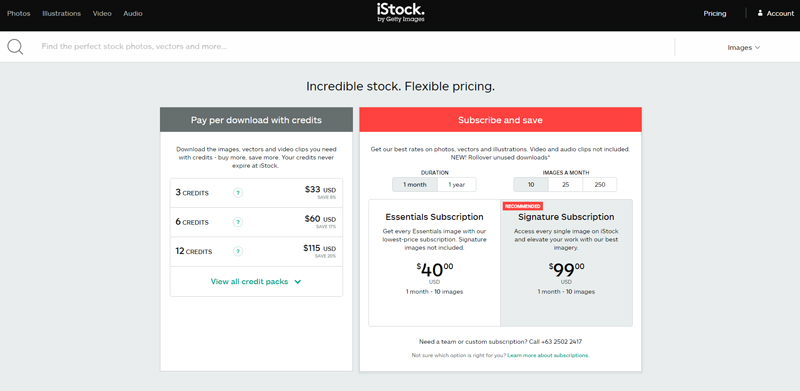
 Being a creative requires more than just design skills and talents. You also need to know where to find the cheapest stock photos to complete or enhance your creative projects. Now, there are a number of sources in the Internet. Do not be tempted to download free images. They come at a certain risk that will damage your reputation and empty your pockets. Instead, purchase cheap stock images from reputable stock photo websites.
  Stock Photo Secrets. SPS is a one-stop shop for all your stock photo needs. Aside from selling the cheapest stock assets, they also have pertinent information about the industry. The most popular plan in the stock site is the 99 Club, which comes with 200 XXL images for only $99. There are no daily download limits, too. Plus, you can purchase additional photos for only 99¢. For extended license, you can also buy image packs for as low as $39. This 5-image pack extends your prints runs to 300,000 or more and allows you to use the images on merchandise for sale.
 Adobe Stock. AS’s 10 standard assets per month annual plan is the cheapest deal at $29.99 per month. It allows you to download additional images for $2.99 each and rollover up to 120 standard assets upon renewal. Currently, a free trial is going on. You may want to take advantage of this time to check out the stock site. It’s cancel-risk free, too. You can cancel your subscription anytime within the first month. The best thing about Adobe Stock is its deep integration with Creative Cloud apps, which is an exclusive feat to CC users. These are cheap stock photos if you use their software.